
YEP Casino – How to Register and Log In
If you want to play for real money, grab bonuses, and climb our VIP ladders, you’ll need a personal account at YEP Casino. Your profile is your hub for deposits, withdrawals, bonuses, and full access to over 2,700 games.
Getting Started: Why You Need an Account
Without an account, you’re basically in “demo tourist” mode and missing all the good stuff. Once you register at YEP Casino, you unlock real money play, a welcome package up to €3,000 plus hundreds of free spins, and our full VIP Club.
You’ll also get a personal dashboard with your balances, transaction history, cashier section, and active bonuses, so you always know where your money is. On top of that, registration is required for banking, security tools, and support to actually help you with your account.
What a YEP account gives you:
- Access to thousands of real money casino games, including slots, live casino, and sports betting.
- Eligibility for the welcome bonus, reload deals, cashback, and free spins in your profile.
- A full Cashier with deposits, withdrawals, and transaction history in one place.
- VIP progression with multiple tiers, higher rewards, and birthday gifts the more you play.
- Security tools like password recovery, account limits, and email confirmations to keep your profile safe.
Now, once you’re ready to dive in, creating that YEP Casino account only takes a couple of minutes.
Step-by-Step Registration at YEP Casino
You’ll go through a simple multi-step signup that starts right on the main page via the Register button in the YEP Casino header. The first step is a short form, then email confirmation, then a quick profile setup so we can tailor the experience to you.
Step 1 – Filling in Your Details
On the first registration screen, you choose whether to sign up with your email or your phone and set a secure password for your YEPCasino account. You’ll also select your preferred currency, with EUR available by default and other options in the same dropdown.
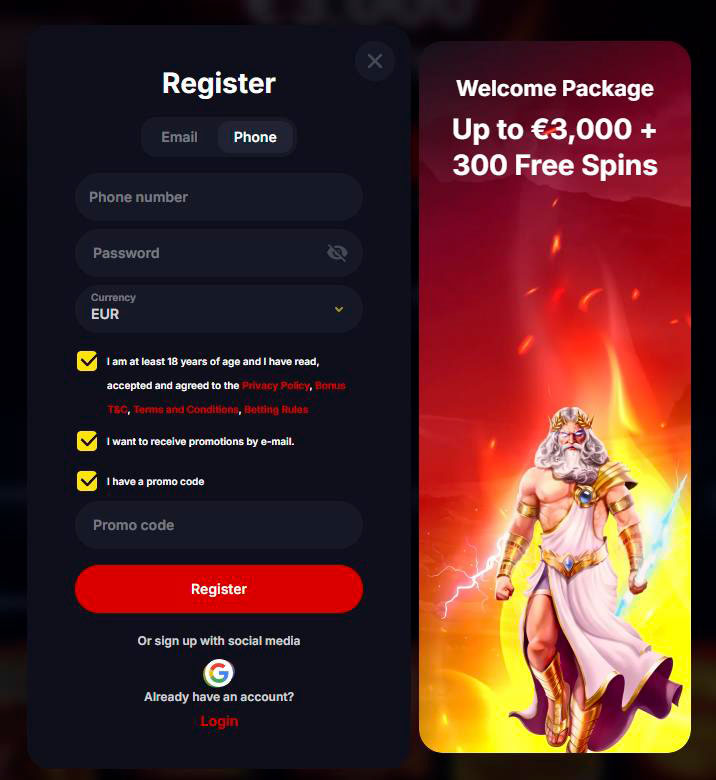
Below the fields, you’ll see checkboxes to confirm you’re at least 18 and agree to the Privacy Policy, Bonus Terms, Terms and Conditions, and Betting Rules, plus optional boxes to receive promos by email and to enter a promo code if you already have one.
Fields and checkboxes in Step 1
| Element | What you enter or choose |
| Email / Phone | Your login email or mobile number |
| Password | At least 6 characters with letters and digits |
| Currency | EUR and other supported currencies |
| 18+ & T&C | Mandatory agreement with Terms and key policies |
| Promo emails | Optional marketing communication via email / SMS |
| Promo code | Optional code field if you have a special offer |
Once that’s done at the YEP Casino site, you hit Register and jump to the next step.
Step 2 – Email Confirmation
Next, we send a confirmation email to the address you entered so we can verify it’s really you. The message includes a secure link that you have to click before full account functionality is unlocked.
Until you confirm your email, you’ll see prompts in the interface that certain actions are limited, and you won’t get the most out of bonuses and notifications. So it’s best to open your inbox right away, find the YEP Casino email, and complete the activation.
Step 3 – Profile Setup
After confirming your email, you finish the registration by filling out your profile details. Here you’ll choose your country of residence from the supported list and add your personal data, such as full name, birth date, address, and phone number if you did not use it earlier.
At this stage, you can also link social accounts that are available in the interface, which makes future logins even quicker and lets you use the same profile across devices. All data is processed according to our KYC and Privacy Policy.
Sign Up via Social Media
Let’s dig into the fastest option: you can create a YEP Casino account via supported social networks like Google directly from the registration form. You’ll see an “Or sign up with social media” line right under the main fields and a one-click button to connect.
When you choose Google Sign Up, we pull your basic details from that profile, so you don’t need to create or remember a separate password for YEP Casino. After linking, you still get the same account with balances, bonuses, and VIP progress as any regular registration.
Why social signup to YEPCasino is handy:
- One-click registration from the main signup screen using Google.
- No separate casino password to remember, you log in via your Google account.
- Same access to welcome bonuses and promotions as standard email signups.
- Works across desktop and mobile so you can log in with one tap on any device.
Bottom line, if you live inside your Google account anyway, this is the easiest way to jump straight into games.
How to Log In to YEP Casino
Whenever you come back, all you need is the Login button in the YEP Casino site header. A small login window pops up where you enter your email and password, and there’s also a “Remember” or device memory option so you don’t have to type details every time on trusted devices.
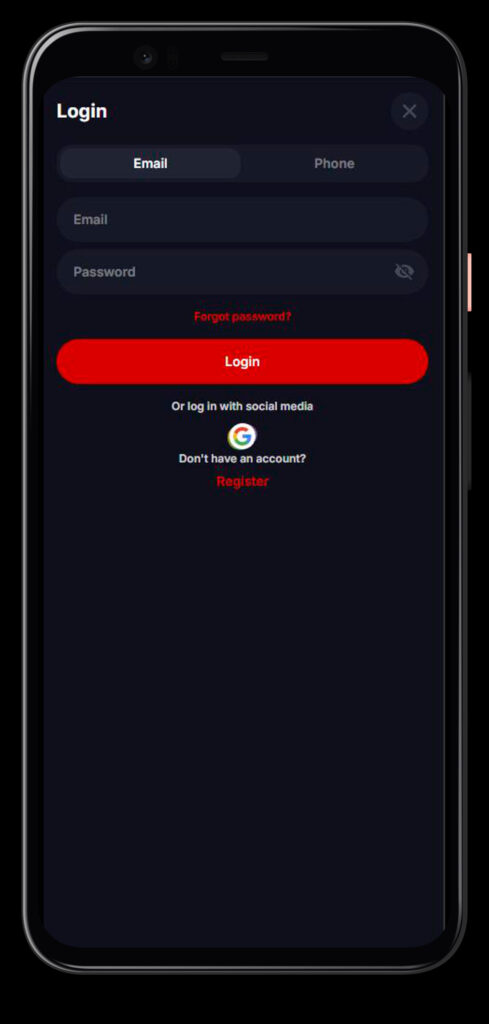
If you used social signup, just hit the social icon in the same area instead of typing credentials manually, and we’ll connect you to the same account instantly as long as you are signed into your social provider.
Login on Desktop
On desktop, the login button sits at the top of the YEP Casino main page alongside Register, Promotions, Sports, and other menu items. Once you click it, you get the familiar two-field form with Email and Password, plus links to registration and password recovery if you need them.
You can tick the “Remember” option to keep your session active longer on a private computer, so returning is as easy as opening the site and clicking into games. For shared or public PCs, we still recommend logging out after each session for safety.
Login via Mobile App
Now, if you prefer playing on your phone, you can install the YEP Casino mobile application and use the same account. The same email or social login and password from desktop work in the Android and iOS apps; there’s no separate registration for mobile.
Once logged in on mobile, you’ll see your real-money balance, bonuses, and VIP status mirrored from the desktop site, and you can make deposits, play, and cash out directly in the app just like on the main platform.
Desktop vs mobile YEP Casino login
| Platform | Where to click | What you use | Extra options |
| Desktop | Header “Login” | Email + password | Remember the device, reset link |
| Mobile | App login | Same credentials | Biometrics, if enabled on the device |
| Both | Social button | Google / other social | No separate YEP password |
Another standout is that you can switch between devices during the day and always land in the same synced account.
Account Security & Password Recovery
We take your privacy seriously and back YEP Casino with advanced encryption and external security certifications like McAfee Secure and FS AntiFraud to protect your data and payments.
On your side, the most important things are using strong login details, keeping them private, and using our built-in recovery tools instead of sharing credentials with anyone, which is also clearly restricted in our Terms and Conditions.
What to Do If You Forgot Your Password
If you ever forget your password, just click Forgot password? in the login window. You’ll be taken to a small form where you enter the email or, in some cases, the phone number that you used during YEP Casino registration to request a reset.
We’ll send a password recovery link or code to your email or phone that lets you set a new password, with on-screen guidance like minimum length and letter/number requirements, so you can get back into your YEP Casino account in minutes.
Password reset steps:
- Open the YEP Casino login form and hit “Forgot password?”.
- Enter your registered email or phone number in the recovery field.
- Check your inbox or SMS for the reset link or code from YEP Casino.
- Follow the link, choose a new strong password, and save changes.
- Log in to YEPCasino again with your updated credentials on any device.
If you still can’t access your account, you can always reach our support via live chat or email for further YEP Casino verification and help.
Protecting Your Account
Honestly, the best security is a mix of our tech and your habits. Use a unique password, avoid saving credentials on shared devices, and never tell your login data to friends, streamers, or “helpers” who promise guaranteed wins, since that is a direct breach of our rules.
You can also keep your contact details updated so that if we see suspicious activity or you trigger limits, we can reach you quickly, and you’ll be able to receive security codes and important notifications without delays.
Your Account Dashboard
After logging in to YEPCasino, you land in a personalised account environment that shows everything that matters to you at a glance. You’ll see your real balance, bonus balance, and sometimes loyalty or VIP points grouped under Balances, plus quick links to your profile, bonuses, and tournaments.
From here, you can open the Cashier to deposit or withdraw, review your transaction and game history, check available bonuses, and see where you stand in the VIP Club, including your current level and unlocked rewards.
Main sections in your dashboard:
- Balance widgets for real money and any active bonus or loyalty points.
- Welcome bonus and “My bonuses” section with active and available offers.
- Cashier area for deposits, withdrawals, and transaction history.
- VIP Club / Loyalty tab with your level, points, and rewards.
- Profile settings with personal data and linked social accounts.
This is basically your command center at YEP Casino, where you manage your money, bonuses, and overall progress in one place.

FAQ
Usually just a couple of minutes: fill the short form, confirm your email, and complete your profile details.
You may see partial access, but key features and full activation rely on confirming your email, and you’ll get prompts in the interface until you do it.
No, the same YEPCasino login and password or social account work on both desktop and mobile apps, so everything stays synced.
Yes, we use advanced encryption, trusted payment providers, and external certificates like McAfee Secure and AntiFraud services.
If the automated recovery does not work or you no longer have access to your email, contact our support team via live chat or email for manual YEP Casino verification.
No, multiple accounts for the same person are not allowed according to our Terms and Conditions, and can lead to blocking.